A single chatbot web UI, specialised for medical imaging, that drives konfai-mcp end to end. A clinician-researcher points it at their own dataset and, from the conversation alone, onboards the data, authors or reuses a model, trains, infers, looks at the results, compares, keeps and reproduces experiments, then deploys the frozen model privately. KonfAI jobs run on the machine hosting Studio; chat messages and tool results go to the language-model endpoint you select. It is a product surface, not a new engine: every capability maps one to one onto an existing konfai-mcp tool.
No API key ships with it: by default Studio uses your Claude Code subscription through the Claude Agent SDK; konfai-studio[anthropic] adds the Claude API with your key, konfai-studio[openai] any OpenAI-compatible server (vLLM, Ollama), which keeps every exchange local.
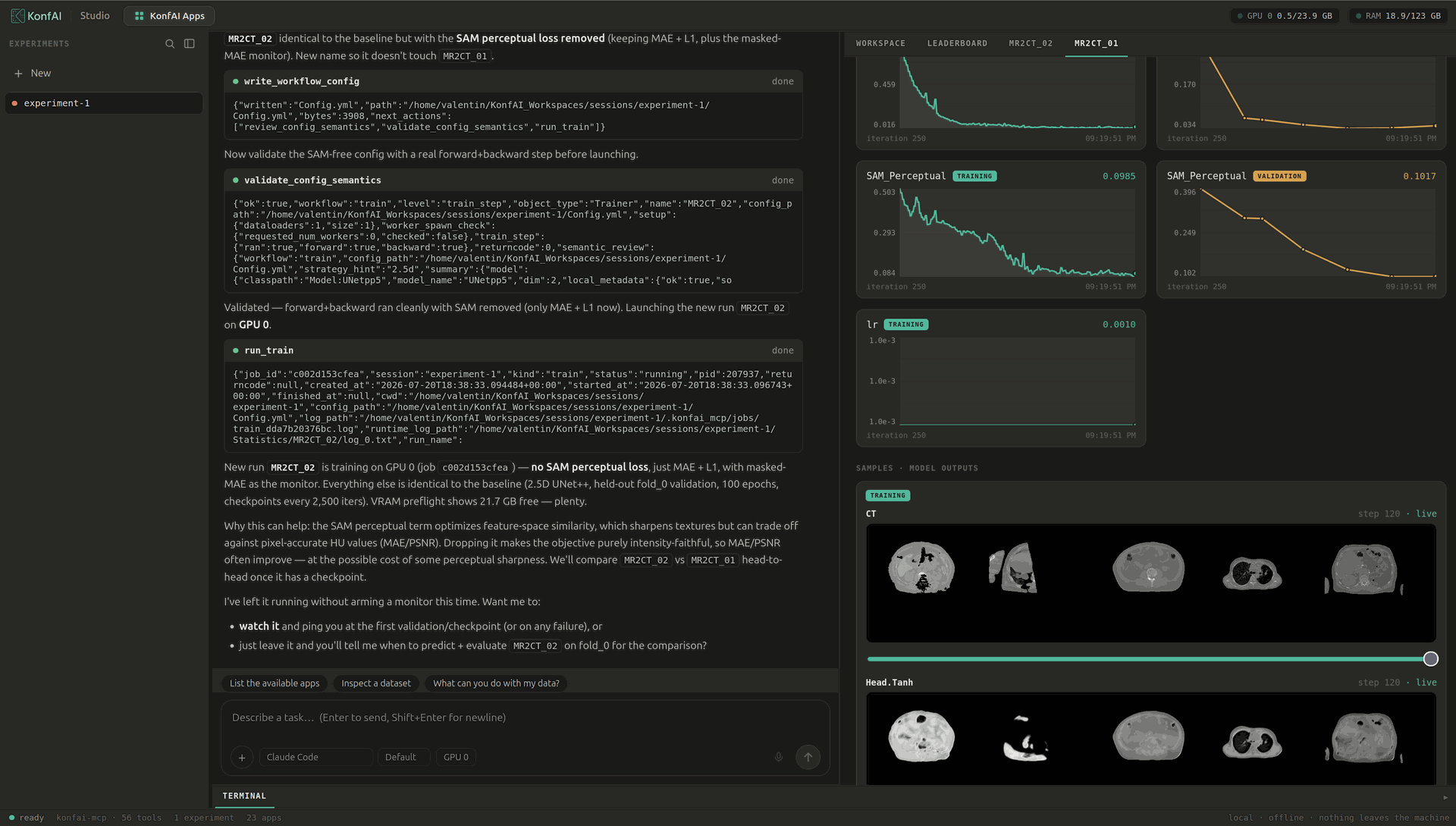
Studio runs an MR to CT synthesis (write the config, validate it, train) while the live feed, the curves of several runs and model-output samples stream beside the chat.
Three ways in
Studio exposes the three modelling entry points as top-level choices, and the agent proposes one when you only describe the task: use an app as it is (a published model on your cases), fine-tune an app on your dataset, or train from scratch from a config the agent writes and validates. Results stream live: metrics, curves, validation samples, and the volumes in the viewer.
Bring a dataset
point at a folder; the agent reads geometry, channels, classes, splits, ambiguities
Just describe the task
the agent decides the route (reuse a published app, fine-tune it, train from scratch) and proposes it transparently; you can override in conversation
Author by conversation
the agent writes the YAML, validates it, can run a real forward and backward before spending GPU hours
Train, predict, evaluate
launch jobs on the GPU, resume interrupted runs, sweep cross-validation folds
Watch it live
live metrics and TensorBoard curves in the tab; cancel anytime
See the result
CT or MR with the prediction overlaid on the scan, prediction against ground truth, in a NiiVue viewer
Compare and rank
metric-by-metric comparison, config diff, leaderboard across runs and sessions
Keep and reproduce
every run is frozen (exact command, environment, config); export a Methods-grade record; a colleague re-imports and re-runs it
Package and deploy
turn a trained model into a shareable app; run it in Slicer, on an on-premise server, or export it to ONNX
See it work
Five real sessions on real data. Each video is one continuous take, sped up but never cut.
Train from your dataset
Point Studio at your images and ask in plain words. Studio inspects the dataset, writes and validates the config, and asks before spending GPU time. Training runs with live curves and validation samples, then the held-out cases are predicted, evaluated, and opened in the viewer next to the ground truth. Watch the take.
Iterate and steer, live
Launch one more run and steer it while it trains. Change the learning rate mid-run, stop the job when you decide, evaluate the same held-out cases, and compare every run on a leaderboard that flags optimistic numbers. Watch the take.
Use a published model
Pick an app from the zoo and run its published weights on your own cases. GPU inference takes seconds per case, the result is scored against your reference mask, and the segmentation opens over its CT in the viewer. Watch the take.
Fit a challenge task
Studio designs a loss shaped for the task's score, writes it as a real PyTorch module, smoke tests it before any GPU hour, and plugs it into the config by classpath. It trains under a time budget, scores the result the way the challenge does, and claims nothing without a fair baseline. Watch the take.
Prepare a whole dataset
The TRANSFORM workflow processes 75 volumes under a 512 MiB memory cap. The plan states, case by case, what will stream in slabs and what simply fits in memory. The whole dataset goes through in about a minute and comes back verified. Watch the take.
Sessions and reproducibility
A session is one isolated experiment workspace (under ~/KonfAI_Workspaces/sessions/<name>/, or $KONFAI_MCP_WORKSPACES_ROOT). It holds many runs, each with its checkpoints, statistics, predictions and evaluations. On every launch, before the process spawns, the server freezes the launch-time YAML and a manifest: the exact command, the environment, the package versions, the GPUs. Export a run's record, and a colleague imports the experiment and runs it again.
Guide: KonfAI Studio. Source: konfai-studio/ (the FastAPI bridge and the React front; the front builds into the package, pip install is enough).